iftop是类似于top的实时流量监控工具,无报表功能,需使用root运行。
官方网站:http://www.ex-parrot.com/~pdw/iftop/
目前最新版本为: iftop-0.17pre3.tar.gz
安装需要:
libpcap和libcurses
用yum或手动编译
yum install libpcap-devel
安装libpcap时出错 http://www.tcpdump.org/ gcc -O2 -I. -DHAVE_CONFIG_H -DU=”attribute((unused))” -c ./fad-getad.c In file included from ./fad-getad.c:64: /usr/include/linux/if_packet.h:52: 错误:expected specifier-qualifier-list before ‘__u32’ make : *** [ fad-getad.o ] 错误 1
iftop界面:
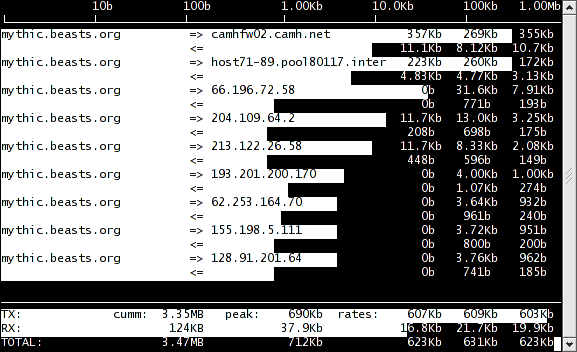
iftop界面说明: 第一行为带宽,这里为1Mbit,不是字节哦. 连接列表,最后三个分别是2秒,10秒和40秒的平均流量 =>代表发送,<= 代表接收 最后三行表示发送,接收和全部的流量,第二列为你运行iftop到目前流量,第三列为高峰值,第四列为平均值。
iftop命令说明: iftop: display bandwidth usage on an interface by host Synopsis: iftop -h | [-npbBP] [-i interface] [-f filter code] [-N net/mask] -h display this message -n don’t do hostname lookups(不进行dns解析) -N don’t convert port numbers to services (直接显示端口号,不显示服务名称) -p run in promiscuous mode (show traffic between other hosts on the same network segment)(嗅探器) -b don’t display a bar graph of traffic -B Display bandwidth in bytes (以字节统计) -i interface listen on named interface -f filter code use filter code to select packets to count (default: none, but only IP packets are counted) -F net/mask show traffic flows in/out of network -P show ports as well as hosts(按照端口对应ip地址) -m limit sets the upper limit for the bandwidth scale -c config file specifies an alternative configuration file iftop, version 0.17pre3 copyright (c) 2002 Paul Warren <[email protected]> and contributors
iftop安装 wget http://www.ex-parrot.com/~pdw/iftop/download/iftop-0.17pre3.tar.gz tar zxvf iftop-0.17pre3.tar.gz cd iftop-0.17pre3 ./configure make make install iftop
========================================================
12.5Kb 25.0Kb 37.5Kb 50.0Kb 62.5Kb mqqqqqqqqqqqqqvqqqqqqqqqqqqqvqqqqqqqqqqqqqvqqqqqqqqqqqqqvqqqqqqqqqqqqq 192.168.54.96 => 192.168.54.83 1.00Kb 1.86Kb 2.42Kb 202.96.209.5 0b 0b 95b <= 0b 0b 168b qqqqqqqqqqqqqqqqqqqqqqqqqqqqqqqqqqqqqqqqqqqqqqqqqqqqqqqqqqqqqqqqqqqqqq TX: cumm: 3.77KB peak: rates:Kb 1.00Kb 1.86Kb 2.51Kb RX: 980B 1.31Kb 160b 518b 653b TOTAL: 4.73KB 7.10Kb 1.16Kb 2.36Kb 3.15Kb


iftop是不错,要是带日志功能就好了。