Skip to content


cacti 监控 mysql status

项目网址 http://code.google.com/p/mysql-cacti-templates/

下载包并取出ss_get_mysql_stats.php 文件

wget http://mysql-cacti-templates.googlecode.com/files/better-cacti-templates-1.1.7.tar.gz tar zxvf better-cacti-templates-1.1.7.tar.gz cd better-cacti-templates-1.1.7/scripts/ cp ss_get_mysql_stats.php /opt/htdocs/www/cacti/scripts/ cd !$ chown www:website ss_get_mysql_stats.php chmod 0775 ss_get_mysql_stats.php vi ss_get_mysql_stats.php

修改 ss_get_mysql_stats.php 中mysql配置

$mysql_user = ‘cacti’; $mysql_pass = ‘cacti’; $cache_dir = “/opt/htdocs/www/cacti/cache/”;

创建缓存目录

cd .. mkdir cache chown www:website cache chmod 0775 cache

mysql 创建用户cacti 给予process 权限,如果要监控InnoDB状态,还必须有”SUPER”权限

CREATE USER ‘cacti’@’192.168.0.1’ IDENTIFIED BY ‘***’; GRANT PROCESS ON * . * TO ‘cacti’@’192.168.0.1’ IDENTIFIED BY ‘***’ WITH MAX_QUERIES_PER_HOUR 0 MAX_CONNECTIONS_PER_HOUR 0 MAX_UPDATES_PER_HOUR 0 MAX_USER_CONNECTIONS 0 ;

在cacti管理界面Import Templates导入 cacti_host_template_x_mysql_server_ht_0.8.6i-sver1.1.7.xml

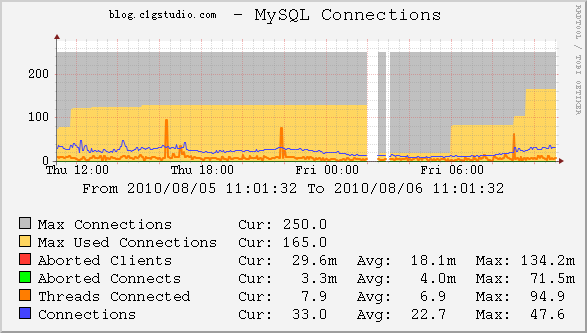
添加图表 New Graphs 选择已有Devices在Associated Graph Templates中添加 X MySQL Connections GT 然后点击Create按钮 过几分钟就可以看到图表

cacti_mysql

====================2014-10-27更新 支持多端口

  1. 在Console -> Data Templates 找到mysql-cacti-templates的mysql模板, 在这里面把Port的Use Per-Data Source Value (Ignore this Value)选中,意思是由用户输入这个参数的值,然后保存。

  2. 在Console->Data Input Methods内,把所有有关mysql数据项的Port都改成不请允许为空 取消选中Allow Empty Input,保存。

  3. 上面全部改完后,在创建图型的时候会提示输入端口: 输入你自己的mysql server端口。然后点create就好了。

参考 http://xok.la/2009/05/cacti_mysql_monitor.html http://www.linuxidc.com/Linux/2011-08/41438.htm

Posted in Cacti, 技术.

Tagged with , , .


cacti 监控 nginx status 支持ip及用户验证

Cacti监控主机:192.168.0.1

Nginx被监控服务器:192.168.0.2

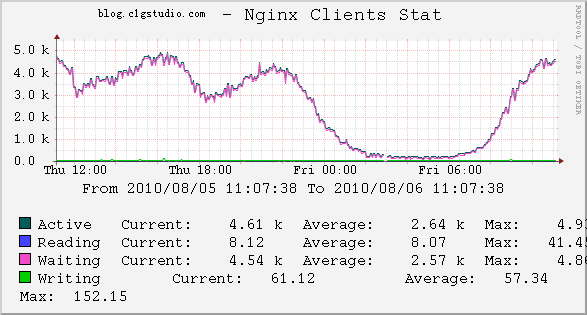
1。首先在编译nginx时允许http_stub_status_module,不然是监控不到nginx的运行状态的

2。编辑配置文件,在要监控的虚拟主机里加入如下内容:

vi /opt/nginx/conf/nginx.conf

###nginx monitor location /nginx_status { stub_status on; access_log off; allow 192.168.0.1; deny all; }

3。重新加载nginx的配置文件

/etc/init.d/nginx restart

4。下载cacti for nginx插件包

wget http://forums.cacti.net/download.php?id=12676

解压后一共有5个文件

tar xvfz cacti-nginx.tar.gz

cp get_nginx_clients_status.pl

/scripts/ cp get_nginx_socket_status.pl /scripts/ chmod 0755 /scripts/get_nginx_socket_status.pl chmod 0755 /scripts/get_nginx_clients_status.pl 5。 检查插件 get_nginx_clients_status.pl http://nginx.server.tld/nginx_status 可以看到如下返回: nginx_accepts:113869 nginx_handled:113869 nginx_requests:122594 6。在后台导入模板文件Import Templates-> Import Template from Local File 把2个监控模板文件导入 cacti_graph_template_nginx_clients_stat.xml cacti_graph_template_nginx_sockets_stat.xml 7。添加图表 New Graphs 选择已有Devices在Associated Graph Templates中添加 Nginx Clients Stat 保存后输入地址如:http://192.168.0.2/nginx 过几分钟就可以看到图表 nginx status 带身份认证 auth_basic “Web_ADMIN”; auth_basic_user_file htpasswd; 方法一: 使用带认证的地址 http://username:[email protected]/nginx 方法二: 修改下get_nginx_clients_status.pl ,把adminname和password换成你的。 适用于所有的主机都使用相同的用户和密码。 15 my $ua = LWP::UserAgent->new(timeout => 5); 16 my $req = HTTP::Headers->new; 17 $req = HTTP::Request->new(GET => $ARGV[0]); 18 19 $req->authorization_basic(‘adminname’,’password’); 20 21 #my $response = $ua->request(HTTP::Request->new(‘GET’,$ARGV[0])); 22 my $response = $ua->request($req); 23 24 my @content = split (/\n/, $response->content); cacti_nginx 参考: http://forums.cacti.net/about26458.html http://www.sitepoint.com/forums/showthread.php?t=597455

Posted in Cacti, 技术.

Tagged with , , .


wordpress open_basedir restriction in effect问题

nginx-0.8.46 php-5.2.14 mysql-5.1.37 eaccelerator-0.9.6.1 wordpress 为官方3.0英文版

安装后在页面出现错误信息

Warning: require() [function.require]: open_basedir restriction in effect. File() is not within the allowed path(s): (/opt/htdocs:/opt/lampp/htdocs:/opt/php/lib/php:/tmp/session:/tmp/upload) in /opt/lampp/htdocs/wordpress/wp-settings.php on line 132

php.ini 中的配置也没错

open_basedir = “/opt/htdocs:/opt/lampp/htdocs:/opt/php/lib/php:/tmp/session:/tmp/upload”

关闭open_basedir或去掉[eaccelerator]之后不会报错,安全起见open_basedir一定要开,eaccelerator换成0.9.5.3后没问题了。

tar jxvf eaccelerator-0.9.5.3.tar.bz2 cd eaccelerator-0.9.5.3/ /opt/php/bin/phpize ./configure –enable-eaccelerator=shared –with-php-config=/opt/php/bin/php-config make make install

参考: http://linux.chinaunix.net/bbs/redirect.php?tid=1162653&goto=lastpost

Posted in PHP, 技术.

Tagged with , , .


Linux下硬盘检测工具smartmontools(smartctl)使用方法

安装: yum install smartmontools

help: #smartctl –help smartctl version 5.38 [i686-redhat-linux-gnu] Copyright (C) 2002-8 Bruce Allen Home page is http://smartmontools.sourceforge.net/

Usage: smartctl [options] device

============================================ SHOW INFORMATION OPTIONS =====

-h, –help, –usage Display this help and exit

-V, –version, –copyright, –license Print license, copyright, and version information and exit

-i, –info
Show identity information for device

-a, –all
Show all SMART information for device

================================== SMARTCTL RUN-TIME BEHAVIOR OPTIONS =====

-q TYPE, –quietmode=TYPE (ATA) Set smartctl quiet mode to one of: errorsonly, silent, noserial

-d TYPE, –device=TYPE Specify device type to one of: ata, scsi, marvell, sat, 3ware,N

-T TYPE, –tolerance=TYPE (ATA) Tolerance: normal, conservative, permissive, verypermissive

-b TYPE, –badsum=TYPE (ATA) Set action on bad checksum to one of: warn, exit, ignore

-r TYPE, –report=TYPE Report transactions (see man page)

-n MODE, –nocheck=MODE (ATA) No check if: never, sleep, standby, idle (see man page)

============================== DEVICE FEATURE ENABLE/DISABLE COMMANDS =====

-s VALUE, –smart=VALUE Enable/disable SMART on device (on/off)

-o VALUE, –offlineauto=VALUE (ATA) Enable/disable automatic offline testing on device (on/off)

-S VALUE, –saveauto=VALUE (ATA) Enable/disable Attribute autosave on device (on/off)

======================================= READ AND DISPLAY DATA OPTIONS =====

-H, –health Show device SMART health status

-c, –capabilities (ATA) Show device SMART capabilities

-A, –attributes
Show device SMART vendor-specific Attributes and values

-l TYPE, –log=TYPE Show device log. TYPE: error, selftest, selective, directory, background, scttemp[sts,hist]

-v N,OPTION , –vendorattribute=N,OPTION (ATA) Set display OPTION for vendor Attribute N (see man page)

-F TYPE, –firmwarebug=TYPE (ATA) Use firmware bug workaround: none, samsung, samsung2, samsung3, swapid

-P TYPE, –presets=TYPE (ATA) Drive-specific presets: use, ignore, show, showall

============================================ DEVICE SELF-TEST OPTIONS =====

-t TEST, –test=TEST Run test. TEST: offline short long conveyance select,M-N pending,N afterselect,[on|off] scttempint,N[,p]

-C, –captive Do test in captive mode (along with -t)

-X, –abort Abort any non-captive test on device

=================================================== SMARTCTL EXAMPLES =====

smartctl –all /dev/hda (Prints all SMART information)

smartctl –smart=on –offlineauto=on –saveauto=on /dev/hda (Enables SMART on first disk)

smartctl –test=long /dev/hda (Executes extended disk self-test)

smartctl –attributes –log=selftest –quietmode=errorsonly /dev/hda (Prints Self-Test & Attribute errors) smartctl –all –device=3ware,2 /dev/sda smartctl –all –device=3ware,2 /dev/twe0 smartctl –all –device=3ware,2 /dev/twa0 (Prints all SMART info for 3rd ATA disk on 3ware RAID controller) smartctl –all –device=hpt,1/1/3 /dev/sda (Prints all SMART info for the SATA disk attached to the 3rd PMPort of the 1st channel on the 1st HighPoint RAID controller)

简单用法: 1、smartctl -a

检查该设备是否已经打开SMART技术。 2、smartctl -s on 如果没有打开SMART技术,使用该命令打开SMART技术。 3、smartctl -t short 后台检测硬盘,消耗时间短; smartctl -t long 后台检测硬盘,消耗时间长; smartctl -C -t short 前台检测硬盘,消耗时间短; smartctl -C -t long 前台检测硬盘,消耗时间长。其实就是利用硬盘SMART的自检程序。 4、smartctl -X 中断后台检测硬盘。 5、smartctl -l selftest 显示硬盘检测日志。 6、smartctl -l error 显示硬盘错误汇总。

Posted in Linux 命令, 技术.

Tagged with , .


Connection closed by remote server

#ssh -p 6022 [email protected]

Connection closed by 192.168.0.18

再ping一下,也没问题 #ping 192.168.0.18

PING 192.168.0.18 (192.168.0.18) 56(84) bytes of data. 64 bytes from 192.168.0.18: icmp_seq=1 ttl=64 time=1.09 ms 64 bytes from 192.168.0.18: icmp_seq=2 ttl=64 time=0.215 ms 64 bytes from 192.168.0.18: icmp_seq=3 ttl=64 time=0.138 ms — 192.168.0.18 ping statistics — 3 packets transmitted, 3 received, 0% packet loss, time 1999ms rtt min/avg/max/mdev = 0.138/0.481/1.090/0.431 ms

看了下web也可以访问,再看一下ssh的详细信息 #ssh -vv -p 6022 192.168.0.18

OpenSSH_4.3p2, OpenSSL 0.9.8e-fips-rhel5 01 Jul 2008 debug1: Reading configuration data /etc/ssh/ssh_config debug1: Applying options for * debug2: ssh_connect: needpriv 0 debug1: Connecting to 192.168.0.18 [192.168.0.18] port 6022. debug1: Connection established. debug1: identity file /home/c1g/.ssh/identity type -1 debug1: identity file /home/c1g/.ssh/id_rsa type -1 debug1: identity file /home/c1g/.ssh/id_dsa type -1 debug1: loaded 3 keys debug1: Remote protocol version 2.0, remote software version OpenSSH_4.3 debug1: match: OpenSSH_4.3 pat OpenSSH* debug1: Enabling compatibility mode for protocol 2.0 debug1: Local version string SSH-2.0-OpenSSH_4.3 debug2: fd 3 setting O_NONBLOCK debug1: SSH2_MSG_KEXINIT sent debug1: SSH2_MSG_KEXINIT received debug2: kex_parse_kexinit: diffie-hellman-group-exchange-sha1,diffie-hellman-group14-sha1,diffie-hellman-group1-sha1 debug2: kex_parse_kexinit: ssh-rsa,ssh-dss debug2: kex_parse_kexinit: aes128-cbc,3des-cbc,blowfish-cbc,cast128-cbc,arcfour128,arcfour256,arcfour,aes192-cbc,aes256-cbc,[email protected],aes128-ctr,aes192-ctr,aes256-ctr debug2: kex_parse_kexinit: aes128-cbc,3des-cbc,blowfish-cbc,cast128-cbc,arcfour128,arcfour256,arcfour,aes192-cbc,aes256-cbc,[email protected],aes128-ctr,aes192-ctr,aes256-ctr debug2: kex_parse_kexinit: hmac-md5,hmac-sha1,hmac-ripemd160,[email protected],hmac-sha1-96,hmac-md5-96 debug2: kex_parse_kexinit: hmac-md5,hmac-sha1,hmac-ripemd160,[email protected],hmac-sha1-96,hmac-md5-96 debug2: kex_parse_kexinit: none,[email protected],zlib debug2: kex_parse_kexinit: none,[email protected],zlib debug2: kex_parse_kexinit: debug2: kex_parse_kexinit: debug2: kex_parse_kexinit: first_kex_follows 0 debug2: kex_parse_kexinit: reserved 0 debug2: kex_parse_kexinit: diffie-hellman-group-exchange-sha1,diffie-hellman-group14-sha1,diffie-hellman-group1-sha1 debug2: kex_parse_kexinit: ssh-rsa,ssh-dss debug2: kex_parse_kexinit: aes128-cbc,3des-cbc,blowfish-cbc,cast128-cbc,arcfour128,arcfour256,arcfour,aes192-cbc,aes256-cbc,[email protected],aes128-ctr,aes192-ctr,aes256-ctr debug2: kex_parse_kexinit: aes128-cbc,3des-cbc,blowfish-cbc,cast128-cbc,arcfour128,arcfour256,arcfour,aes192-cbc,aes256-cbc,[email protected],aes128-ctr,aes192-ctr,aes256-ctr debug2: kex_parse_kexinit: hmac-md5,hmac-sha1,hmac-ripemd160,[email protected],hmac-sha1-96,hmac-md5-96 debug2: kex_parse_kexinit: hmac-md5,hmac-sha1,hmac-ripemd160,[email protected],hmac-sha1-96,hmac-md5-96 debug2: kex_parse_kexinit: none,[email protected] debug2: kex_parse_kexinit: none,[email protected] debug2: kex_parse_kexinit: debug2: kex_parse_kexinit: debug2: kex_parse_kexinit: first_kex_follows 0 debug2: kex_parse_kexinit: reserved 0 debug2: mac_init: found hmac-md5 debug1: kex: server->client aes128-cbc hmac-md5 none debug2: mac_init: found hmac-md5 debug1: kex: client->server aes128-cbc hmac-md5 none debug1: SSH2_MSG_KEX_DH_GEX_REQUEST(1024

在输入密码后就断掉了,把机器重启下后,可以登录了。

查看/var/log/messages 和 /var/log/cron 发现从凌晨3点起就没有记录了,估计是磁盘出错变成不可写适成不能登录。

Posted in LINUX, 技术.

Tagged with .


RRDtool 1.4.4 安装

RRDtool介绍

rrdtool-3dlogo RRDTool是由Tobias Oetiker开发的自由软件,它使用RRD(Round Robin Database)作为存储格式,Round robin是一种处理定量数据、以及当前元素指针的技术。RRDTool主要用来跟踪对象的变化情况,生成这些变化的走势图。

stream-pop

07/09/10释放的cacti-0.8.7g已支持rrdtool-1.4X 我选择05-Jul-2010 最新释放的rrdtool-1.4.4.tar.gz 系统为centos 5.2,已安装yum

安装支持包 yum install libxml2-devel libpng-devel pkg-config glib pixman pango pango-devel freetype freetype-devel fontconfig cairo cairo-devel libart_lgpl libart_lgpl-devel

安装rrdtool

wget http://oss.oetiker.ch/rrdtool/pub/rrdtool-1.4.4.tar.gz tar zxvf rrdtool-1.4.4.tar.gz cd rrdtool-1.4.4 ./configure –prefix=/usr/local/rrdtool-1.4.4 –disable-tcl –disable-python ordering CD from http://tobi.oetiker.ch/wish …. just kidding ;-) —————————————————————- Config is DONE! With MMAP IO: yes Build rrd_getopt: no Static programs: no Perl Modules: perl_piped perl_shared Perl Binary: /usr/bin/perl Perl Version: 5.8.8 Perl Options: PREFIX=/usr/local/rrdtool-1.4.4 LIB=/usr/local/rrdtool-1.4.4/lib/perl/5.8.8 Ruby Modules: Ruby Binary: no Ruby Options: sitedir=/usr/local/rrdtool-1.4.4/lib/ruby Build Lua Bindings: no Build Tcl Bindings: no Build Python Bindings: no Build rrdcgi: yes Build librrd MT: yes Use gettext: yes With libDBI: no Libraries: -lxml2 -lcairo -lcairo -lcairo -lm -lcairo -lpng12 -lglib-2.0 -lpangocairo-1.0 -lpango-1.0 -lcairo -lgobject-2.0 -lgmodule-2.0 -ldl -lglib-2.0 Type ‘make’ to compile the software and use ‘make install’ to install everything to: /usr/local/rrdtool-1.4.4.

出现下面信息可能缺少支持包

configure: error: Please fix the library issues listed above and try again. make make install ln -s /usr/local/rrdtool-1.4.4 /usr/local/rrdtool /usr/local/rrdtool/bin/rrdtool -v RRDtool 1.4.4 Copyright 1997-2010 by Tobias Oetiker Compiled Jul 22 2010 11:18:48 Usage: rrdtool [options] command command_options Valid commands: create, update, updatev, graph, graphv, dump, restore, last, lastupdate, first, info, fetch, tune, resize, xport, flushcached RRDtool is distributed under the Terms of the GNU General Public License Version 2. (www.gnu.org/copyleft/gpl.html) For more information read the RRD manpages

参考: rrdtool 1.3.7安装 https://blog.c1gstudio.com/archives/459

Posted in RRDtool.

Tagged with .


cacti 监控远程主机

环境介绍 安装cacti的监控机A,ip为 192.168.0.16 安装snmp的被监控机B,ip为 192.168.0.17 系统为centos 4/5

被监控B机安装snmp net-snmp 安装参考

修改B机snmp配置,充许外部访问 自带的snmp配置文件在/etc/snmp/snmpd.conf; 编译安装的snmp配置文件在/usr/local/etc/snmp/snmpd.conf; vi /etc/snmp/snmpd.conf

com2sec local localhost privatepass #安装教程中配置的本机访问要权限 com2sec mynetwork 192.168.0.16 privatepass #新增的外部访问权限,192.168.0.16为监控机ip,privatepass 为安全码可以和local不同 group MyROGroup v1 local group MyROGroup v2c local group MyROGroupnet v1 mynetwork #新增 group MyROGroupnet v2c mynetwork #新增 view mib2 included .iso.org.dod.internet.mgmt.mib-2 fc view all included .1 80 #新增 access MyROGroup “” any noauth exact mib2 none none access MyROGroupnet “” any noauth exact all none none #新增 #以下为访问项目,如果想监控磁盘空间,load等需把注释去掉 #编译安装默认已去掉,自带安装的需手动把注释去掉 # Make sure mountd is running proc mountd #去掉前面的”#” # Make sure there are no more than 4 ntalkds running, but 0 is ok too. proc ntalkd 4 # Make sure at least one sendmail, but less than or equal to 10 are running. proc sendmail 10 1 # Check the / partition and make sure it contains at least 10 megs. disk / 10000 # Check for loads: load 12 14 14

重启snmpd服务 #/etc/init.d/snmpd restart 或 #killall -9 snmpd #/usr/local/sbin/snmpd

iptables规则 假如B机开启了iptables并且INPUT默认策略为DROP 在第一条插入充许192.168.0.16(监控机)以udp协议访问snmpd默认161端口的规则

/sbin/iptables -I INPUT -p udp -m udp -s 192.168.0.16 –dport 161 -j ACCEPT

保存一下,防止重启服务后失效

/etc/init.d/iptables save

测试snmp 在A机上先看下系统信息 #snmpwalk -v 2c -c privatepass 192.168.0.17 system

SNMPv2-MIB::sysDescr.0 = STRING: Linux touareg 2.6.18-128.el5 #1 SMP Wed Jan 21 10:41:14 EST 2009 x86_64 SNMPv2-MIB::sysObjectID.0 = OID: NET-SNMP-MIB::netSnmpAgentOIDs.10 DISMAN-EVENT-MIB::sysUpTimeInstance = Timeticks: (59664) 0:09:56.64 SNMPv2-MIB::sysContact.0 = STRING: Root (configure /etc/snmp/snmp.local.conf) SNMPv2-MIB::sysName.0 = STRING: touareg SNMPv2-MIB::sysLocation.0 = STRING: Unknown (edit /etc/snmp/snmpd.conf) SNMPv2-MIB::sysORLastChange.0 = Timeticks: (7) 0:00:00.07 SNMPv2-MIB::sysORID.1 = OID: SNMPv2-MIB::snmpMIB SNMPv2-MIB::sysORID.2 = OID: TCP-MIB::tcpMIB SNMPv2-MIB::sysORID.3 = OID: IP-MIB::ip SNMPv2-MIB::sysORID.4 = OID: UDP-MIB::udpMIB SNMPv2-MIB::sysORID.5 = OID: SNMP-VIEW-BASED-ACM-MIB::vacmBasicGroup SNMPv2-MIB::sysORID.6 = OID: SNMP-FRAMEWORK-MIB::snmpFrameworkMIBCompliance SNMPv2-MIB::sysORID.7 = OID: SNMP-MPD-MIB::snmpMPDCompliance SNMPv2-MIB::sysORID.8 = OID: SNMP-USER-BASED-SM-MIB::usmMIBCompliance SNMPv2-MIB::sysORDescr.1 = STRING: The MIB module for SNMPv2 entities SNMPv2-MIB::sysORDescr.2 = STRING: The MIB module for managing TCP implementations SNMPv2-MIB::sysORDescr.3 = STRING: The MIB module for managing IP and ICMP implementations SNMPv2-MIB::sysORDescr.4 = STRING: The MIB module for managing UDP implementations SNMPv2-MIB::sysORDescr.5 = STRING: View-based Access Control Model for SNMP. SNMPv2-MIB::sysORDescr.6 = STRING: The SNMP Management Architecture MIB. SNMPv2-MIB::sysORDescr.7 = STRING: The MIB for Message Processing and Dispatching. SNMPv2-MIB::sysORDescr.8 = STRING: The management information definitions for the SNMP User-based Security Model. SNMPv2-MIB::sysORUpTime.1 = Timeticks: (6) 0:00:00.06 SNMPv2-MIB::sysORUpTime.2 = Timeticks: (6) 0:00:00.06 SNMPv2-MIB::sysORUpTime.3 = Timeticks: (6) 0:00:00.06 SNMPv2-MIB::sysORUpTime.4 = Timeticks: (6) 0:00:00.06 SNMPv2-MIB::sysORUpTime.5 = Timeticks: (6) 0:00:00.06 SNMPv2-MIB::sysORUpTime.6 = Timeticks: (7) 0:00:00.07 SNMPv2-MIB::sysORUpTime.7 = Timeticks: (7) 0:00:00.07 SNMPv2-MIB::sysORUpTime.8 = Timeticks: (7) 0:00:00.07

没有问题,再看下磁盘信息 #snmpwalk -v 2c -c privatepass 192.168.0.17 .1.3.6.1.4.1.2021.9

UCD-SNMP-MIB::dskIndex.1 = INTEGER: 1 UCD-SNMP-MIB::dskPath.1 = STRING: / UCD-SNMP-MIB::dskDevice.1 = STRING: /dev/mapper/VolGroup00-LogVol01 UCD-SNMP-MIB::dskMinimum.1 = INTEGER: 10000 UCD-SNMP-MIB::dskMinPercent.1 = INTEGER: -1 UCD-SNMP-MIB::dskTotal.1 = INTEGER: 44628400 UCD-SNMP-MIB::dskAvail.1 = INTEGER: 22383404 UCD-SNMP-MIB::dskUsed.1 = INTEGER: 19941408 UCD-SNMP-MIB::dskPercent.1 = INTEGER: 47 UCD-SNMP-MIB::dskPercentNode.1 = INTEGER: 1 UCD-SNMP-MIB::dskErrorFlag.1 = INTEGER: noError(0) UCD-SNMP-MIB::dskErrorMsg.1 = STRING:

出现下面这个信息,你需要检查下A机snmpd.conf中“disk / 10000”前的注释有无去掉。

UCD-SNMP-MIB::dskTable = No Such Object available on this agent at this OID

“.1.3.6.1.4.1.2021.9″代表磁盘 “.1.3.6.1.4.1.2021.10″代表load,可以参考snmpd.conf中的注释

监控机cacti增加监控设备 Console -> Devices->add cacti add device 在设置页面配置

Description:touareg Hostname:192.168.0.17 Host Template:ucd/net SNMP Host Downed Device Detection:Ping and SNMP SNMP Version:预定义的设置

保存后在页面左上角可以看到调试信息

touareg (192.168.0.17) SNMP Information System:Linux touareg 2.6.18-128.el5 #1 SMP Wed Jan 21 10:41:14 EST 2009 x86_64 Uptime: 38790 (0 days, 0 hours, 6 minutes) Hostname: touareg Location: Unknown (edit /etc/snmp/snmpd.conf) Contact: Root root@localhost (configure /etc/snmp/snmp.local.conf) cacti graphs 1) ucd/net – CPU Usage Not Being Graphed (cpu负载,system,user,nice) 2) ucd/net – Load Average Not Being Graphed (系统平均负载,1分钟,5分钟,15分钟) 3) ucd/net – Memory Usage Not Being Graphed (内存使用,free,buffers,cache) 1) SNMP – Interface Statistics (网卡流量,in,out) 2) ucd/net – Get Monitored Partitions (根分区,free,used) Not Being Graphed 表示还末生成图像,创建图像后会变成Is Being Graphed 我们可以再添加一些更详细的监控 Host MIB – Processes 监控进程数量 Host MIB – Logged in Users 监控登录用户 SNMP – Get Mounted Partitions 更多分区大小,Memory Buffer,Real Memory,Swap Space SNMP – Get Processor Information 每个cpu的负载 临控对像增加图表 左则New Graphs 在host中选择touareg cacti graphs2 勾选右则后选择create,就完成了图表创建,真是很方便。 添加到Graph Trees 图表创建后在Graph Management里可以看到图表,但点击导航上方的”graphs”是看不到的,需要添加到graph trees中。 Console -> Graph Trees -> (Edit) -> Graph Tree Items
Tree Item Type:host Host:touareg
创建后就可以在graph中看到了 cacti graph tree 参考:http://docs.cacti.net/manual:087:2_basics.0_principles_of_operation#principles_of_operation

Posted in Cacti, 技术.

Tagged with , .


在 Android 手机上运行 PHP

PHP可不仅仅只能在互联网站上发展,一个PHP for Android (PFA)网站表示他们将可以发布编程模型、工具盒文档让PHP在Android上实现应用。该项目的主要赞助商是开源公司IronTec,PFA使用Scripting Layer for Android (SL4A),也就是Androd Scripting Environment (ASE)来实现这一点,您可以参看他们的网站来了解更多技术内幕。

1.下载并安装ASE 扫描下面的二维码,可在你的手机上安装个条码扫描器(BarcodeScanner)

或用浏览器下载并安装 http://phpforandroid.net/files/ASEr26unofficial.apk

2.安装PhpForAndroid.apk

或用浏览器下载并安装 http://phpforandroid.net/files/PhpForAndroid_r1.apk

3.运行 安装好PhpForAndroid_r1.apk后再运行ASE就可以看到5个php demo hello_world.php

getInput(“Hi!”, “What is your name?”); $droid->makeToast(‘Hello, ‘ . $name[‘result’]);

list_items.php

dialogCreateAlert(); $droid->dialogSetItems(range(0, 9)); $droid->dialogShow();

phpinfo.php

<?php require_once("Android.php"); … phpinfo();#这里是我编辑器问题改成了全角

testnow.php

<?php require_once("Android.php"); $droid = new Android(); //include("http://YOURHOST/yourfile.php.txt");

vibrate.php

vibrate();

点击phpinfo.php文件开始运行; 程序会输出php的相关信息,当前使用的php版本为5.3.3rc2

$ export TEMP=”/sdcard/ase/extras/php/tmp” $ export AP_PORT=”37356″ $ export PHPHOME=”/data/data/com.irontec.phpforandroid/php” $ export PHPPATH=”/sdcard/ase/extras/php” $ /data/data/com.irontec.phpforandroid/php/bin/php -c $PHPPATH /sdcard/ase/scripts/phpinfo.php FIX ME! implement getprotobyname() bionic/libc/bionic/stubs.c:402 FIX ME! implement getprotobyname() bionic/libc/bionic/stubs.c:402 phpinfo() PHP Version => 5.3.3RC2 System => Linux localhost 2.6.29.6-xdan #20 PREEMPT Sat Mar 27 03:36:57 EDT 2010 armv6l Build Date => Jul 4 2010 19:40:10 Configure Command => ‘./configure’ ‘–disable-all’ ‘–target=arm-linux’ ‘–enable-cli’ ‘–enable-json’ ‘–enable-sockets’ Server API => Command Line Interface Virtual Directory Support => disabled Configuration File (php.ini) Path => /usr/local/lib Loaded Configuration File => /sdcard/ase/extras/php/php.ini Scan this dir for additional .ini files => (none) Additional .ini files parsed => (none) PHP API => 20090626 PHP Extension => 20090626 Zend Extension => 220090626 Zend Extension Build => API220090626,NTS PHP Extension Build => API20090626,NTS Debug Build => no Thread Safety => disabled Zend Memory Manager => enabled Zend Multibyte Support => disabled IPv6 Support => disabled Registered PHP Streams => php, file, data, http, ftp Registered Stream Socket Transports => tcp, udp, unix, udg Registered Stream Filters => string.rot13, string.toupper, string.tolower, string.strip_tags, convert.*, consumed, dechunk This program makes use of the Zend Scripting Language Engine: Zend Engine v2.3.0, Copyright (c) 1998-2010 Zend Technologies _______________________________________________________________________ Configuration Core PHP Version => 5.3.3RC2 Directive => Local Value => Master Value allow_call_time_pass_reference => On => On allow_url_fopen => On => On allow_url_include => On => On always_populate_raw_post_data => Off => Off arg_separator.input => & => & arg_separator.output => & => & asp_tags => Off => Off auto_append_file => no value => no value auto_globals_jit => On => On auto_prepend_file => no value => no value browscap => no value => no value default_charset => no value => no value default_mimetype => text/html => text/html define_syslog_variables => Off => Off disable_classes => no value => no value disable_functions => no value => no value display_errors => STDOUT => STDOUT display_startup_errors => On => On doc_root => no value => no value docref_ext => no value => no value docref_root => no value => no value enable_dl => Off => Off error_append_string => no value => no value error_log => no value => no value error_prepend_string => no value => no value error_reporting => 22527 => 22527 exit_on_timeout => Off => Off expose_php => On => On extension_dir => /usr/local/lib/php/extensions/no-debug-non-zts-20090626 => /usr/local/lib/php/extensions/no-debug-non-zts-20090626 file_uploads => On => On highlight.bg => #FFFFFF => #FFFFFF highlight.comment => #FF8000 => #FF8000 highlight.default => #0000BB => #0000BB highlight.html => #000000 => #000000 highlight.keyword => #007700 => #007700 highlight.string => #DD0000 => #DD0000 html_errors => Off => Off ignore_repeated_errors => Off => Off ignore_repeated_source => Off => Off ignore_user_abort => Off => Off implicit_flush => On => On include_path => .:/sdcard/ase/extras/php => .:/sdcard/ase/extras/php log_errors => Off => Off log_errors_max_len => 1024 => 1024 magic_quotes_gpc => Off => Off magic_quotes_runtime => Off => Off magic_quotes_sybase => Off => Off mail.add_x_header => Off => Off mail.force_extra_parameters => no value => no value mail.log => no value => no value max_execution_time => 0 => 0 max_file_uploads => 20 => 20 max_input_nesting_level => 64 => 64 max_input_time => -1 => -1 memory_limit => 128M => 128M open_basedir => no value => no value output_buffering => 0 => 0 output_handler => no value => no value post_max_size => 8M => 8M precision => 14 => 14 realpath_cache_size => 16K => 16K realpath_cache_ttl => 120 => 120 register_argc_argv => On => On register_globals => Off => Off register_long_arrays => Off => Off report_memleaks => On => On report_zend_debug => Off => Off request_order => GP => GP safe_mode => Off => Off safe_mode_exec_dir => no value => no value safe_mode_gid => Off => Off safe_mode_include_dir => no value => no value sendmail_from => no value => no value sendmail_path => /usr/sbin/sendmail -t -i => /usr/sbin/sendmail -t -i serialize_precision => 100 => 100 short_open_tag => On => On SMTP => localhost => localhost smtp_port => 25 => 25 sql.safe_mode => Off => Off track_errors => Off => Off unserialize_callback_func => no value => no value upload_max_filesize => 2M => 2M upload_tmp_dir => no value => no value user_dir => no value => no value user_ini.cache_ttl => 300 => 300 user_ini.filename => .user.ini => .user.ini variables_order => GPCS => GPCS xmlrpc_error_number => 0 => 0 xmlrpc_errors => Off => Off y2k_compliance => On => On zend.enable_gc => On => On date date/time support => enabled “Olson” Timezone Database Version => 2010.9 Timezone Database => internal Warning: phpinfo(): It is not safe to rely on the system’s timezone settings. You are *required* to use the date.timezone setting or the date_default_timezone_set() function. In case you used any of those methods and you are still getting this warning, you most likely misspelled the timezone identifier. We selected ‘America/Chicago’ for ‘CST/-CST/no DST’ instead in /sdcard/ase/scripts/phpinfo.php on line 4 Default timezone => America/Chicago Directive => Local Value => Master Value date.default_latitude => 31.7667 => 31.7667 date.default_longitude => 35.2333 => 35.2333 date.sunrise_zenith => 90.583333 => 90.583333 date.sunset_zenith => 90.583333 => 90.583333 date.timezone => no value => no value ereg Regex Library => Bundled library enabled json json support => enabled json version => 1.2.1 pcre PCRE (Perl Compatible Regular Expressions) Support => enabled PCRE Library Version => 8.02 2010-03-19 Directive => Local Value => Master Value pcre.backtrack_limit => 100000 => 100000 pcre.recursion_limit => 100000 => 100000 Reflection Reflection => enabled Version => $Revision: 300393 $ sockets Sockets Support => enabled SPL SPL support => enabled Interfaces => Countable, OuterIterator, RecursiveIterator, SeekableIterator, SplObserver, SplSubject Classes => AppendIterator, ArrayIterator, ArrayObject, BadFunctionCallException, BadMethodCallException, CachingIterator, DirectoryIterator, DomainException, EmptyIterator, FilesystemIterator, FilterIterator, InfiniteIterator, InvalidArgumentException, IteratorIterator, LengthException, LimitIterator, LogicException, MultipleIterator, NoRewindIterator, OutOfBoundsException, OutOfRangeException, OverflowException, ParentIterator, RangeException, RecursiveArrayIterator, RecursiveCachingIterator, RecursiveDirectoryIterator, RecursiveFilterIterator, RecursiveIteratorIterator, RecursiveRegexIterator, RecursiveTreeIterator, RegexIterator, RuntimeException, SplDoublyLinkedList, SplFileInfo, SplFileObject, SplFixedArray, SplHeap, SplMinHeap, SplMaxHeap, SplObjectStorage, SplPriorityQueue, SplQueue, SplStack, SplTempFileObject, UnderflowException, UnexpectedValueException standard Dynamic Library Support => enabled Path to sendmail => /usr/sbin/sendmail -t -i Directive => Local Value => Master Value assert.active => 1 => 1 assert.bail => 0 => 0 assert.callback => no value => no value assert.quiet_eval => 0 => 0 assert.warning => 1 => 1 auto_detect_line_endings => 0 => 0 default_socket_timeout => 60 => 60 safe_mode_allowed_env_vars => PHP_ => PHP_ safe_mode_protected_env_vars => LD_LIBRARY_PATH => LD_LIBRARY_PATH url_rewriter.tags => a=href,area=href,frame=src,form=,fieldset= => a=href,area=href,frame=src,form=,fieldset= user_agent => no value => no value Additional Modules Module Name Environment Variable => Value ANDROID_ROOT => /system PHPPATH => /sdcard/ase/extras/php LD_LIBRARY_PATH => /system/lib PATH => /usr/bin:/usr/sbin:/bin:/sbin:/system/sbin:/system/bin:/system/xbin:/system/xbin/bb:/data/local/bin AP_PORT => 37356 ANDROID_SOCKET_zygote => 11 TEMP => /sdcard/ase/extras/php/tmp BOOTCLASSPATH => /system/framework/core.jar:/system/framework/ext.jar:/system/framework/framework.jar:/system/framework/android.policy.jar:/system/framework/services.jar ANDROID_BOOTLOGO => 1 ANDROID_ASSETS => /system/app EXTERNAL_STORAGE => /sdcard ANDROID_DATA => /data TERMINFO => /system/etc/terminfo ANDROID_PROPERTY_WORKSPACE => 10,32768 PHPHOME => /data/data/com.irontec.phpforandroid/php PHP Variables Variable => Value _SERVER[“ANDROID_ROOT”] => /system _SERVER[“PHPPATH”] => /sdcard/ase/extras/php _SERVER[“LD_LIBRARY_PATH”] => /system/lib _SERVER[“PATH”] => /usr/bin:/usr/sbin:/bin:/sbin:/system/sbin:/system/bin:/system/xbin:/system/xbin/bb:/data/local/bin _SERVER[“AP_PORT”] => 37356 _SERVER[“ANDROID_SOCKET_zygote”] => 11 _SERVER[“TEMP”] => /sdcard/ase/extras/php/tmp _SERVER[“BOOTCLASSPATH”] => /system/framework/core.jar:/system/framework/ext.jar:/system/framework/framework.jar:/system/framework/android.policy.jar:/system/framework/services.jar _SERVER[“ANDROID_BOOTLOGO”] => 1 _SERVER[“ANDROID_ASSETS”] => /system/app _SERVER[“EXTERNAL_STORAGE”] => /sdcard _SERVER[“ANDROID_DATA”] => /data _SERVER[“TERMINFO”] => /system/etc/terminfo _SERVER[“ANDROID_PROPERTY_WORKSPACE”] => 10,32768 _SERVER[“PHPHOME”] => /data/data/com.irontec.phpforandroid/php _SERVER[“PHP_SELF”] => /sdcard/ase/scripts/phpinfo.php _SERVER[“SCRIPT_NAME”] => /sdcard/ase/scripts/phpinfo.php _SERVER[“SCRIPT_FILENAME”] => /sdcard/ase/scripts/phpinfo.php _SERVER[“PATH_TRANSLATED”] => /sdcard/ase/scripts/phpinfo.php _SERVER[“DOCUMENT_ROOT”] => _SERVER[“REQUEST_TIME”] => 1279269078 _SERVER[“argv”] => Array ( [0] => /sdcard/ase/scripts/phpinfo.php ) _SERVER[“argc”] => 1 PHP License This program is free software; you can redistribute it and/or modify it under the terms of the PHP License as published by the PHP Group and included in the distribution in the file: LICENSE This program is distributed in the hope that it will be useful, but WITHOUT ANY WARRANTY; without even the implied warranty of MERCHANTABILITY or FITNESS FOR A PARTICULAR PURPOSE. If you did not receive a copy of the PHP license, or have any questions about PHP licensing, please contact [email protected].

运行结束后就是控制台界面,按menu键会出来Exit&Edit可以进入编辑模式; 编辑模式下有API Browser可供调用,save & Run就可以调试程序了。 在我的g1,1.6固件上运行正常。

安装教程 http://www.phpforandroid.net/screencast

Posted in Android, 其它.

Tagged with , , .


google JavaScript Style Guide

Google JavaScript Style Guide 另有C++ Style Guide, Objective-C Style Guide, and Python Style Guide

http://code.google.com/p/google-styleguide/

Posted in JavaScript/DOM/XML, 技术.

Tagged with , .


cacti 安装npc 整合 nagios

Cacti是一套PHP程序,它使用snmpget命令采集数据、RRDTool绘图。Cacti界面简洁直观,让你根本无需明白RRDTool的众多参数即可轻松绘制出漂亮的图形。另外,它还提供了强大的数据管理和用户管理功能。在图像管理上,Cacti采用了树状结构的查看界面,在用户管理上,能对用户的权限进行细致划分,甚至支持使用LDAP进行用户验证。Cacti主要功能包括:数据定时采集、图像绘制与显示、树状的主机和图像管理、RRDTool信息管理、用户和权限管理以及模板导入导出等。

cactilogo

1.Cacti系统组成

  Cacti系统由4个部分组成:

  Cacti页面(PHP)——用户控制的平台,用户在此进行所有的设置;

  SNMP采集工具——Unix下使用 Net-SNMP软件包自带的“snmpget”和“snmpwalk”等程序,Windows下使用PHP的SNMP功能;

  RRDTool绘图引擎——性能数据的存储和绘画图像;

  MySQL数据库——储存RRDTool绘图所需的信息,如模板、rra、主机对应的信息等,要注意的是MySQL数据库并不保存性能数据,性能数据保存在RRDTool自己的数据库格式rrd文件中。利用Cacti可以对校园网络进行很好的实时监控,从而做到运筹帷幄。 2.菜单功能介绍

  Console菜单包括了New Graphs(创建新图像)、Graph Management(图像管理)、Graph Trees(图像树)、Data Sources(管理rrd文件)、Devices(设备管理)、 Data Queries 和Data Input Methods(采集数据方式)、Graph Templates(图像模板)、Host Templates(主机类型模板)、Data Templates(数据模板)、Import Templates(模板导入)、Export Templates(模板导出)Settings(Cacti的主要配置菜单)、System Utilities(显示Cacti系统的一些cache和log信息)、User Management(用户管理)、Logout User (用户退出登录)等菜单选项。

  Grapes菜单包括三种查看图像的形式,分别为setting、树形显示、列表型显示和预览型显示。 cacti_promo_main

在线demo: http://status.pulpfree.org/cacti/graph_view.php?action=tree&tree_id=3&leaf_id=28&select_first=true http://www.querx.com/cacti/graph_view.php?action=tree&tree_id=1&leaf_id=9 http://www.kende.com/cacti/graph_view.php?action=tree&tree_id=1&leaf_id=7&select_first=true 更多demo: http://www.cacti.net/sites_that_use_cacti.php

最新版本: The latest stable version is 0.8.7g, released 07/09/10. http://www.cacti.net/download_cacti.php 0.8.7g版本和某些插件有兼容型问题,如npc,thold,我安装下来在顶部不能正常显示导航菜单。 cacti的版本要和插件架构匹配,我装0.8.7e+cacti-plugin-0.8.7f-PA可以使用,但顶部导航显示不正确。 这里选用0.8.7e+cacti-plugin-0.8.7e-PA

依赖关系: 安装之前需lamp环境 安装参考 net-snmp 安装参考 RRDTool 安装参考 php扩展 安装参考 php_json pdo_mysql sockets nagios 安装参考 ndoutils 安装参考

下载cacti: cd /opt/htdocs/www wget wget http://www.cacti.net/downloads/cacti-0.8.7e.tar.gz wget http://mirror.cactiusers.org/downloads/plugins/cacti-plugin-0.8.7e-PA-v2.6.zip wget http://www.constructaegis.com/downloads/npc-2.0.4.tar.gz

constructaegis.com域名已过期 可以使用svn checkout http://svn2.assembla.com/svn/npc/trunk

安装cacti: 我的nginx运行用户为www组为website 安装路径为/opt/htdocs/www

tar zxvf cacti-0.8.7e.tar.gz mv cacti-0.8.7e cacti chown -R www:website cacti chmod -R 0775 cacti

安装cacti数据库: 创建cacti库,并创建cacti用户给予它cacti库权限,也可以使用phpmyadmin来完成. 导入cacti.sql到cacti库

mysql –u root –p mysql>create database cacti; mysql>use cacti; Mysql>source /opt/htdocs/www/cacti/cacti.sql Mysql>grant all privileges on cacti.* to cacti@localhost identified by ‘cactipass’; #添加一个数据库账号cacti 密码为cactipass 用以访问cacti库 Mysql>flush privileges; #刷新权限信息

配置cacti数据库信息 #cd cacti #vi include/config.php

$database_type = “mysql”; $database_default = “cacti”; $database_hostname = “localhost”; $database_username = “cactiuser”; $database_password = “cacti”;

配置cacti自动运行: #crontab -e

*/5 * * * * /opt/php/bin/php /opt/htdocs/www/cacti/poller.php > /dev/null 2>&1

Spine更有效率可以选择性安装

配置cacti: 访问cacti的web地址,就会显示安装界面 http://nagios.c1gstudio.com/cacti/

1.选择”新的安装”

2.配置路径(以系统中实际安装路径为准) /usr/local/rrdtool/bin/rrdtool /opt/php/bin/php /usr/local/bin/snmpwalk /usr/local/bin/snmpget /usr/local/bin/snmpbulkwalk /usr/local/bin/snmpgetnext

3.默认用户名及密码 admin/admin 接着输入新的密码

4.进入cacti后台 设置相应版本及验证码 settings->General RRDTool Utility Version = RRDTool1.3.X SNMP Version = 2 SNMP Community = 你的验证码(privatepass ) save

5.查看报表 点graphs选项5分钟后应该可以看到4个报表. memory usage load average logged in users processers

6.创建磁盘监控 在首页点击Create graphs然后在Data Query栏目中勾上需要监控的分区保存.

以上完成了cacti安装,下面安装插件 在安装插件前需先安装”插件框架”

安装插件框架: 1.解压

cd /opt/htdocs/www unzip cacti-plugin-0.8.7e-PA-v2.6.zip chown -R www:website cacti-plugin-arch/ chmod -R 0775 cacti-plugin-arch

2.导入数据库结构

mysql -u cacti -p cacti

3.覆盖文件 方法一:覆盖

cp –rf cacti-plugin-arch/files-0.8.7e/* /opt/htdocs/www/cacti

方法二:打补丁

cp cacti-plugin-arch/cacti-plugin-0.8.7e-PA-v2.6.diff /opt/htdocs/www/cacti/ cd /opt/htdocs/www/cacti/ patch -p1 -N

我用方法一

4.配置插件的数据库信息 #cd /opt/htdocs/www/cacti/ #vi include/global.php #插件数据库需再配置一下

$database_type = “mysql”; $database_default = “cacti”; $database_hostname = “localhost”; $database_username = “cactiuser”; $database_password = “cacti”;

5.配制插件

#我的cacti安装在域下的cacti目录,这里也需修改 $config[‘url_path’] = ‘/cacti/’; #为后面安装npc增加变量 $plugins[] = ‘npc’;

注:0.8.7g开始上面两变量改放在includes/config.php中,如果参照以前的教程会找不到了囧 参见Change Log http://forums.cacti.net/viewtopic.php?t=38492

安装NPC插件: 1.解压后移到plugins目录下

cd /opt/htdocs/www unzip npc.zip chown -R www:website npc chmod -R 0775 npc mv npc cacti/plugins/

2.启用cacti的插件功能, 以admin用户登陆cacti,在console中的user management里对admin的用户权限进行编辑, 勾选上Plugin Management、NPC、NPC Global Commands 然后到Plugin Management 安装并启用NPC即可。 在Settings->npc中 勾上Remote Commands Nagios Command File Path=/usr/local/nagios/var/rw/nagios.cmd Nagios URL=你的地址(http://nagios.c1gstudio.com/nagios/)

3.配置ndoutils 参见

如果一切正常点击导航菜单npc后就可以看到信息了。 没有显示可能有以下原因:

  1. cacti和npc版本不兼容
  2. cacti和plugin框架版本不一致
  3. npc没有正确安装(数据库结构不对)
  4. ndoutils没有正确配置(数据库中无信息)
  5. php-json,pdo_mysql,sockets没有安装(php -m 检查一下)

留意cacti/log/cacti.log文件

============================== 2010-07-23 spine安装 #wget http://www.cacti.net/downloads/spine/cacti-spine-0.8.7e.tar.gz #tar zxvf cacti-spine-0.8.7e.tar.gz #cd cacti-spine-0.8.7e #./configure #make #make install #vi /usr/local/spine/etc/spine.conf

DB_Host localhost DB_Database cacti DB_User cactiuser DB_Pass cacti DB_Port 3306

#mv /usr/local/spine/etc/spine.conf /etc/ #/usr/local/spine/bin/spine

SPINE: Using spine config file [/etc/spine.conf] SPINE: Version 0.8.7e starting SPINE: Time: 7.3153 s, Threads: 1, Hosts: 11

配置spine (1)登陆console–Configuration–Settings–poller–Poller Type改为spine (2)登陆console–Configuration–Settings–paths–Spine Poller File Path添加/usr/local/spine/bin/spine

#tail /opt/htdocs/www/cacti/log/cacti.log 07/23/2010 03:20:02 PM – POLLER: Poller[0] ERROR: The path: /usr/local/spine/bin/spine is invalid. Can not continue #如果你的php有open_basedir限制,需加上/usr/local/spine/bin/目录 07/23/2010 03:25:04 PM – SYSTEM STATS: Time:3.2262 Method:spine Processes:1 Threads:1 Hosts:11 HostsPerProcess:11 DataSources:190 RRDsProcessed:147 #相比php方式快很多


参考: http://liuyu.blog.51cto.com/183345/259995 http://www.cacti.net/downloads/docs/html/install_unix.html

Posted in Cacti.

Tagged with , , , .